Advertisement
Kogama Campus Quest

Kogama Campus Quest

Developer: Super Core Dev
Updated: 2026-07-21
Adventure , Family , Creative , Exploration , Multiplayer , Casual

Review

Kogama Campus Quest succeeds in creating a low-pressure environment that encourages exploration and social interaction. The variety of themed rooms and hidden mini-games keeps the experience fresh, while the simple controls make it accessible to all ages. The safe chat system and avatar customization add depth without complexity. It is an ideal choice for families looking for a cooperative, non-violent online activity.

Faq

Is Kogama Campus Quest free to play?
Yes, the game is free to play directly in your web browser. There are no hidden fees or subscriptions required to access the full school campus and its activities. Some optional cosmetic items may be available for purchase, but these are not necessary to enjoy the core experience.
Can I play Kogama Campus Quest on a mobile device?
The game is primarily designed for desktop and laptop computers with a keyboard and mouse. While some mobile browsers may support it, the controls are optimized for keyboard input, so the experience on phones or tablets may not be as smooth.
How does the chat system ensure player safety?
The in-game chat includes filters that block inappropriate language and personal information. Additionally, players can report any concerns to moderators. The system is designed to create a safe space for social interaction, especially for younger audiences.
Are there any time limits or scores to beat?
No, there are no strict time limits or competitive scoring systems. The game focuses on free exploration and personal enjoyment. Players can spend as much time as they like in any area without pressure to achieve specific goals.
Can I invite friends to play with me?
Yes, you can invite friends by sharing the game's URL. Once they load the page, they will appear in the same virtual school environment. You can then explore together, chat, and participate in mini-games as a group.
What kind of avatar customization options are available?
Players can change their character's clothing, hairstyle, and accessories. Options include various shirts, pants, hats, and glasses. The customization is cosmetic only and does not affect gameplay, allowing everyone to express their personal style.

About This Game

Setting and Atmosphere

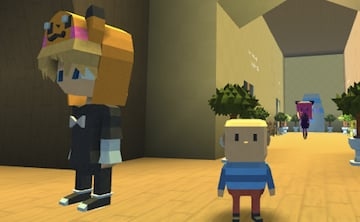
Kogama Campus Quest turns a typical school environment into a vibrant sandbox. Players control a character and navigate through a series of themed areas, including a science lab, an art studio, a sports field, and a music room. Each location is designed with bright colors and playful details that encourage curiosity. The atmosphere is relaxed and welcoming, making it suitable for players of all ages who enjoy discovery without pressure.

Core Activities and Mini-Games

The primary goal is to explore every corner of the campus. Hidden throughout the school are various mini-games and interactive objects. For example, in the art studio, players might solve a simple puzzle to unlock a new area, while the sports field offers a short obstacle course. These activities are designed to be quick and rewarding, fitting well into short gaming sessions or longer play periods. The game does not impose strict objectives, allowing players to set their own pace.

Social Interaction and Customization

Multiplayer functionality is a key component. Players can see others in the same virtual school and communicate through a built-in chat system that is moderated for safety. This allows for cooperative exploration or friendly competitions in the mini-games. Additionally, players can personalize their avatar with a selection of outfits and accessories. This customization adds a layer of self-expression and encourages repeat visits to try different looks.

Accessibility and Technical Requirements

Kogama Campus Quest runs entirely in a web browser, requiring no installation or special hardware. The controls are straightforward: arrow keys or WASD for movement, spacebar for jumping. This simplicity ensures that even those new to gaming can join without difficulty. The game is optimized for quick loading and stable performance on most modern browsers, making it an accessible choice for families and casual gamers.


Compatibility

This H5 game runs smoothly on:
• Desktop computers (Windows / Mac) • Mobile phones (iPhone / Android)
• Tablets (iPad / Android)
🌐 Best experienced with Chrome, Safari, or Edge

Comments

0 comments
U
User
Loading comments...