Core Gameplay Loop
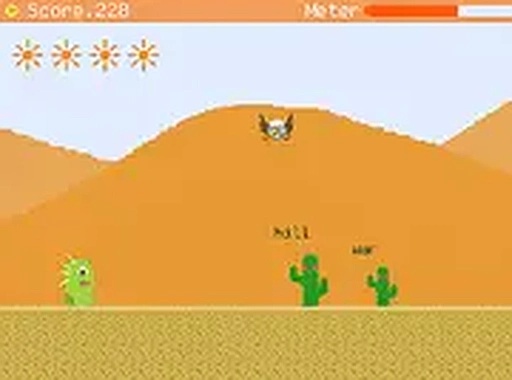
In Desert Typing Defense, each opponent that appears on screen carries a word. Your task is to type that word before the opponent reaches your character. Success removes the threat; failure or delay reduces your health. This simple loop creates a rhythm that becomes more intense as waves progress. The game rewards players who can maintain accuracy under pressure, making each round a test of both speed and focus.
Opponent Variety and Strategy
Not all opponents behave the same way. Some move directly toward your character, while others take indirect paths or launch projectiles from a distance. This variety forces you to prioritize targets based on their threat level. A slow-moving opponent with a long word might be less urgent than a fast one with a short word. Learning to read these patterns is key to surviving later stages.
Visual Style and Atmosphere
The game uses a retro pixel art aesthetic that recalls classic arcade cabinets. Each stage introduces a new background and color palette, keeping the visual experience from feeling stale. The simple but clear character and enemy designs make it easy to track multiple opponents at once. This art style also keeps the game lightweight, so it runs smoothly in any modern browser without downloads or plugins.
Progression and Difficulty Curve
Desert Typing Defense gradually increases the challenge across multiple stages. Early rounds introduce basic words and slow opponents, giving new players time to build confidence. Later stages mix longer words, faster enemies, and more complex attack patterns. This curve ensures that both beginners and experienced typists find appropriate difficulty. The health system, represented by sun icons, adds a layer of resource management: accurate typing earns extra suns, while mistakes deplete them.
Accessibility and Platform
The game is designed for desktop computers with a physical keyboard. It runs directly in a web browser with no installation required. Full-screen mode is available to reduce visual distractions. Because the game is free and browser-based, it is easy to pick up for a quick session or to practice typing skills over longer periods. No account creation or personal data is needed to play.








Comments
0 comments