3D Lane Runner Endless Run

3D Lane Runner Endless Run

Developer: Artisan Core Digital
Published: 2025-02-12
Updated: 2026-07-03
| Casual , Running , Arcade

Review

3D Lane Runner delivers an engaging endless running experience with intuitive swipe controls and vibrant 3D environments. The progressive speed increase keeps each run challenging, while power-ups like shields and score multipliers add strategic depth. The game is perfect for short play sessions and runs smoothly on most devices. Its family-friendly design makes it accessible to all ages.

About This Game

Game Introduction

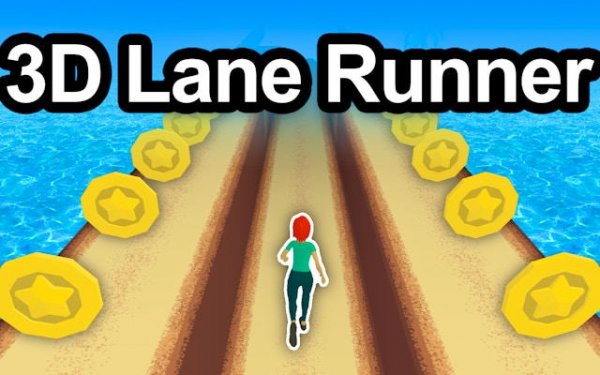
3D Lane Runner is an endless running game where you guide a character through vibrant 3D environments. The main goal is to run as far as possible while avoiding obstacles that appear along the path. As your speed increases, the challenges become more demanding, testing your reflexes and timing. With family-friendly visuals and straightforward mechanics, the game offers an engaging experience for players of all ages. Each run is unique, making it perfect for quick play sessions or longer gaming breaks. The game is designed to be accessible and fun, with no complex rules to learn.

How to Play

Your character runs forward automatically. You control the runner by swiping on the screen: swipe left or right to move between three lanes, swipe up to jump over low barriers, and swipe down to slide under high obstacles. Timing is crucial for jumps and slides to avoid crashes. As you progress, the game speed increases, requiring faster reactions. The game ends when you hit an obstacle, so stay focused and keep moving.

Game Features

Intuitive swipe controls that are easy to learn. The obstacle course changes with each run, offering variety. Power-ups like Shields, Speed Bursts, and Score Multipliers add strategic depth. Global leaderboards let you compare scores with players worldwide. The game runs smoothly on most devices and loads quickly in a web browser. It is designed for short play sessions or longer runs, making it suitable for breaks or extended play.

Tips for Success

Practice regularly to improve your reflexes and timing. Learn to anticipate obstacles by watching the path ahead. Use power-ups strategically—save shields for difficult sections and speed bursts when you have a clear lane. Stay calm as speed increases; panicking leads to mistakes. Focus on consistent lane changes rather than risky moves. Over time, you will develop muscle memory for smoother runs.


Compatibility

This H5 game runs smoothly on:
• Desktop computers (Windows / Mac) • Mobile phones (iPhone / Android)
• Tablets (iPad / Android)
🌐 Best experienced with Chrome, Safari, or Edge

Faq

Is 3D Lane Runner free to play?
Yes, 3D Lane Runner is a free online game. You can play it directly in your web browser without any download or payment. Optional in-game purchases may be available for cosmetic items or power-ups, but the core experience is completely free.
What devices support 3D Lane Runner?
3D Lane Runner runs on most modern devices with a web browser, including desktop computers, tablets, and smartphones. The game is optimized for touch controls on mobile devices and keyboard controls on desktop. A stable internet connection is recommended for smooth performance.
How do power-ups work in 3D Lane Runner?
Power-ups appear randomly during runs. The Shield protects you from one obstacle, the Speed Burst gives a temporary speed increase, and the Score Multiplier doubles points earned for a short time. You can collect multiple power-ups, but they are used one at a time.
Can I save my progress in 3D Lane Runner?
Yes, your high scores and achievements are automatically saved to your browser's local storage. If you clear your browser data, this information may be lost. Some versions may offer account-based saving for cross-device play, but this is not guaranteed.
Are there different characters or skins in 3D Lane Runner?
The game may include various character skins or color options that you can unlock by achieving certain scores or completing challenges. These are purely cosmetic and do not affect gameplay. Check the game's settings or shop menu for available options.
What happens when my speed increases in 3D Lane Runner?
As you run farther, the game speed gradually increases. This makes obstacles appear faster and requires quicker reactions. The lane changes and jump/slide timings become more challenging, but the core controls remain the same. This progressive difficulty keeps the game exciting.